Facilities Work-Order Support
Dispatch EPS through ServiceChannel for emergency commercial plumbing, HVAC, refrigeration, and verified hot-side repair across approved Texas markets.
Serving commercial facilities since 1986 · Texas Master Plumber M-18274
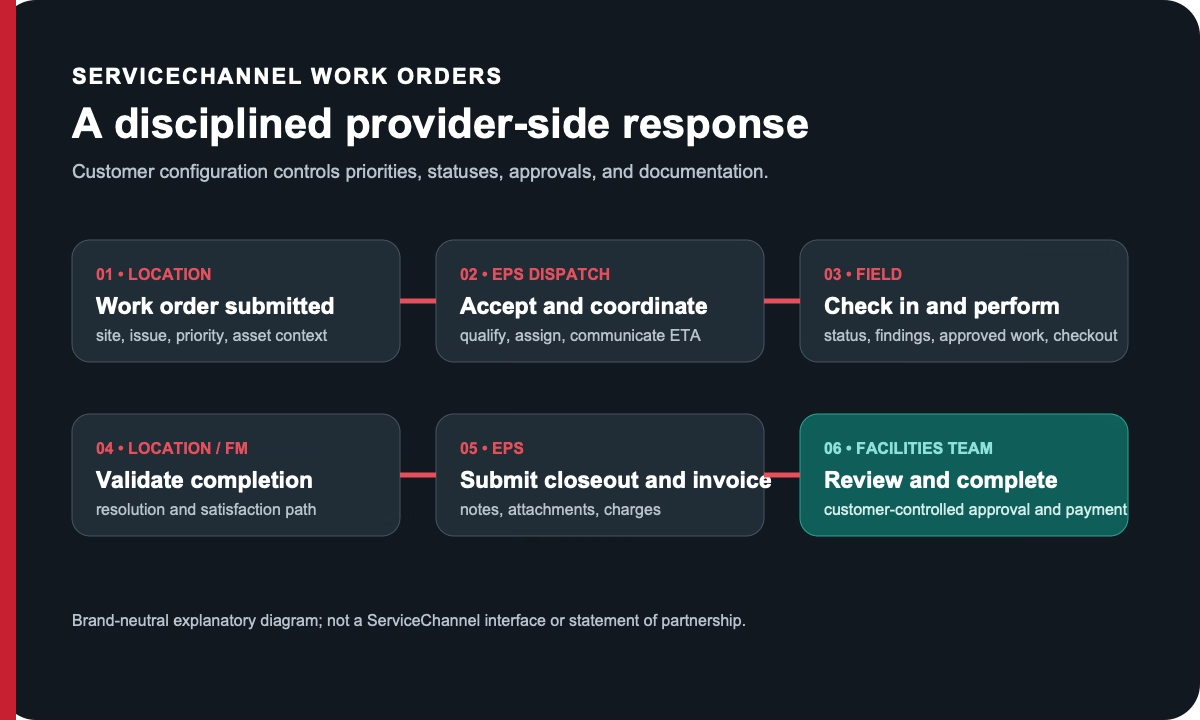
When a location has an active plumbing, HVAC, or refrigeration problem, the phone escalation and ServiceChannel record need to tell the same story. EPS supports facilities teams with 24/7 dispatch, work-order acknowledgement, field status, documented diagnosis, approval handling, and complete closeout inside the customer's required ServiceChannel workflow.
EPS works with facilities teams that manage repair and maintenance activity through ServiceChannel. We can coordinate emergency commercial plumbing, HVAC, and refrigeration work orders within the customer's required workflow—from acknowledgement and dispatch through status updates, service documentation, quote handling, and closeout.
For an active emergency, call EPS dispatch and reference the ServiceChannel work-order number so the verbal escalation and platform record stay connected.
For an urgent ServiceChannel work order, call EPS dispatch and reference the work-order number, priority, location, affected trade or asset, access instructions, and not-to-exceed context. That keeps the verbal escalation connected to the customer-controlled record.
EPS follows the customer’s configured acknowledgement, check-in, status, diagnosis, quote, photo, completion-note, and invoice-documentation requirements. ServiceChannel is identified only as a work-order environment customers may use; no software partnership or automated integration is implied.
For an active emergency, call live dispatch and reference the customer platform and work-order number. For planned or recurring needs, share the account, locations, trades, and workflow requirements.
Commercial facilities only Share the site, trade, operating impact, and work-order context. EPS dispatch will use the information to route the next conversation.Request Planned Commercial Service