Facilities Work-Order Support
Route approved Ecotrak work orders to EPS for emergency commercial plumbing, HVAC, refrigeration, and hot-side service across verified Texas markets.
Serving commercial facilities since 1986 · Texas Master Plumber M-18274
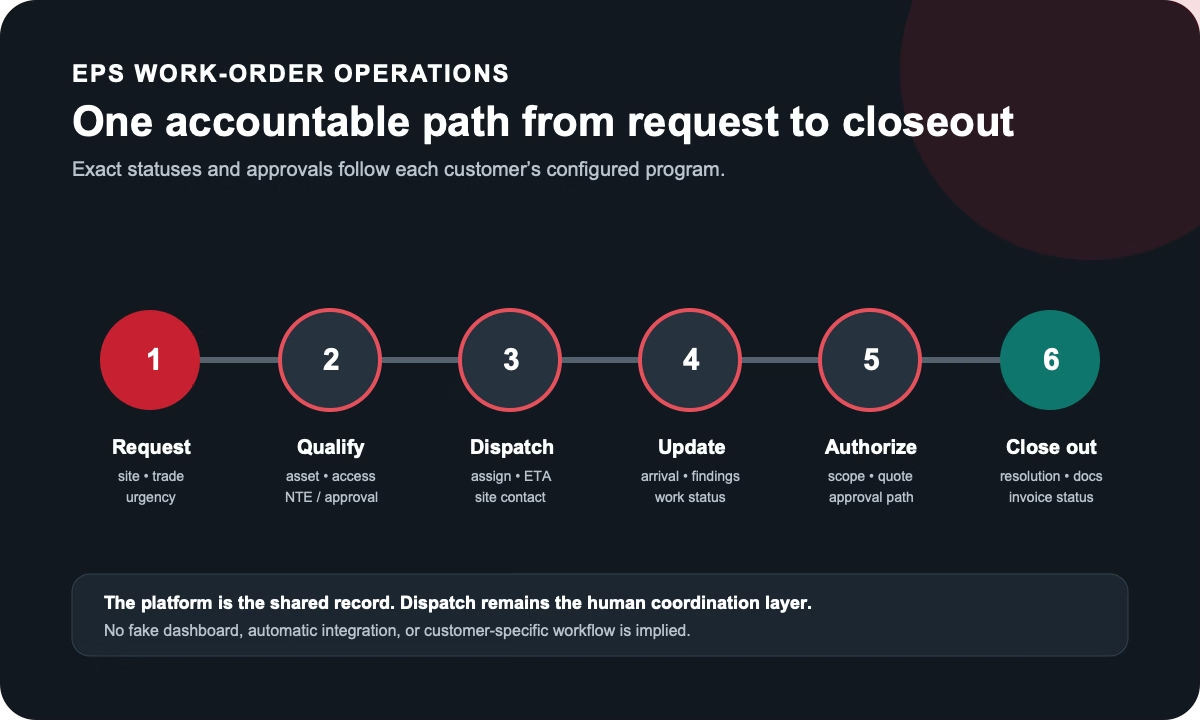
Facilities and restaurant operators use Ecotrak to connect service requests with locations, equipment, providers, proposals, preventive maintenance, purchase orders, and repair history. EPS supports customer-routed Ecotrak work orders with live 24/7 dispatch and disciplined field communication for commercial plumbing, HVAC, refrigeration, and verified hot-side equipment service.
For an active emergency, call dispatch and reference the Ecotrak work-order number, exact location, equipment or trade, observed condition, operating impact, priority, access details, and approval instructions. EPS coordinates the phone escalation with the customer's work-order process so site stakeholders and facilities leaders receive one consistent operating story.
Ecotrak publicly describes work-order, asset, proposal, purchase-order, preventive-maintenance, dispatch, provider-network, and reporting capabilities. The customer's actual program configuration remains authoritative. EPS should describe provider-side execution—not a software integration, endorsement, partnership, certification, or guaranteed SLA.
For customer-authorized Ecotrak work, EPS intake connects the work-order number to the exact location, trade, equipment or system, observable condition, operating impact, access, priority, and approval rules.
EPS coordinates dispatch, field status, diagnosis, quote or return needs, completion notes, and invoice documentation within the workflow the customer provides. Platform references describe the work-order environment only and do not imply endorsement or technical integration.
For an active emergency, call live dispatch and reference the customer platform and work-order number. For planned or recurring needs, share the account, locations, trades, and workflow requirements.
Commercial facilities only Share the site, trade, operating impact, and work-order context. EPS dispatch will use the information to route the next conversation.Request Planned Commercial Service